Review Comments (0) Screenshots (7) Questions & Answers (0) Votes (14) Awards (9) Wiki  
(14)
Aimersoft Studio
2.4.1
www.aimersoft.com
Shareware
$35.95  Purchase
2 268 people
Download Aimersoft Video...

Downloaded 1249 times

It is possible that the download link provided above does not refer to the intended version. If you are looking for Aimersoft Video Converter, you may try searching for a download link using Google.

 
Video tutorial for Aimersoft Video Converter 2.3
Frame
This video tutorial has been acquired from Downloadtube.com

Review

This is official description applies to version 2.4

Aimersoft Video Converter is the best Video Converter that comes with many powerful functions. It not only converts video and audio files between various formats, it also makes it possible to play the common video files on your iPad, iPod, iPhone, Zune, PSP, Xbox 360, Motorola Droid/Cliq, Google nexus one, mobile phones, etc.

Key Features:
1.Convert video to popular video/audio formats (MP4, WMV, AVI, FLV, MOV, 3GP, WMA, M4A, and MP3 etc) without any losses.
2.Convert High Definition video output formats, such as HD TS, HD AVI, HD WMV, HD MOV, HD MPG, HD ASF, HD MP4 etc.
3.You can select the audio track while right clicking the source file.
4.Split a single video file into multiple by setting the split time or split size to satisfy your needs.
5.Clip any segments from any video files
6.Crop the frame size of video files
7.Merge/join multiple files into one file
 
The following review written by one of the Software Informer contributors applies to version 2.3

Aimersoft Video Converter is a powerful video conversion tool that can convert videos for multimedia phones, PSP, PS3, Window mobiles, Ipods and many other multimedia players.

The converter has a built in video editor, cutter and merge tool that enable you to zoom, crop or trim any video. You can add watermarks or subtitles to the video file using the built-in powerful editor or you can change brightness, contrast or saturation settings too. A video preview with powerful play controls enables you to see the original and modified video in the same window.

The converter also supports batch conversions. Just add multiple videos to the conversion list, choose an output profile and get all your videos converted ready to be shared with friends or for your portable multimedia player. A fabulous feature of the tool is its merging capability. You can join all the videos listed in the batch list to get a single, large video file. You can trim their length using the editor to get desired parts of videos joined. You can remove adds from the videos using this feature or create a movie from multiple clips recorded using your camera phone.

Aimersoft Video Converter does not care about the input formats of the videos. You can merge videos from different video formats. You can also merge audio files with video. There is lot more that you can do with this powerful video tool. You can make a snapshot and save your favorite scene as JPEG image in a single click. You can customize the video output settings like video resolution, frame rate, encoder and audio quality also to convert videos supported by your multimedia player not listed in the output profiles.

The trial version is fully functioning but leaves a watermark on the videos. Support for all the popular input and output video formats and easy user interface make this converter a professional class video tool.
  • Easy to use.
  • Perfect video converter with support for all the popular video output formats.
  • Built-in video merge and splitting tools.
  • None.

Reviewed by: Jasminder Singh

Reviewer rating:

Reviewed: 2 years ago

What's new in version 2.3

1. Add output of 5.1 sound track.
2. Support output formats for playing on iPhone 3G S.
3. Add F4V, HD TS, HD MPG, and MP4 based on MC code as output formats.
4. Support DPG format for Nintendo NDS.
5. Increase the conversion speed.

What's new in version 2.0

1. Add output of 5.1 sound track.
2. Support output formats for playing on iPhone 3G S.
3. Add F4V, HD TS, HD MPG, and MP4 based on MC code as output formats.
4. Support DPG format for Nintendo NDS.
5. Increase the conversion speed.

What's new in version 1.1

Fix some bugs.
Report a wrong version Report a wrong program title Suggest a correction

Screenshots

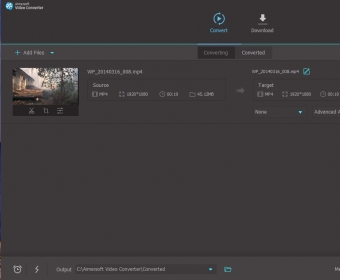
Converter window Converter window Video editor and effect tools Video editor and effect... Output profiles Output profiles Version details Version details
All 7 screenshots

Latest comments


There are no comments, be the first one!
Add new comment

E-mail Address:

Password:

Register now »

Forgot password?

Sign in with:
Download Software Informer Client
Copyright © 2012, Informer Technologies, Inc. About| Privacy and terms| Help| Feedback & Support| Partners program